Make the process clear to your team
Connect triggers, conditions and wait times in the visual editor. See the sequence of actions and decide what happens based on contact or deal data.
Automation
Confirmations, tasks and CRM updates can follow a defined workflow. Your team gains time for conversations and cases that need a person.
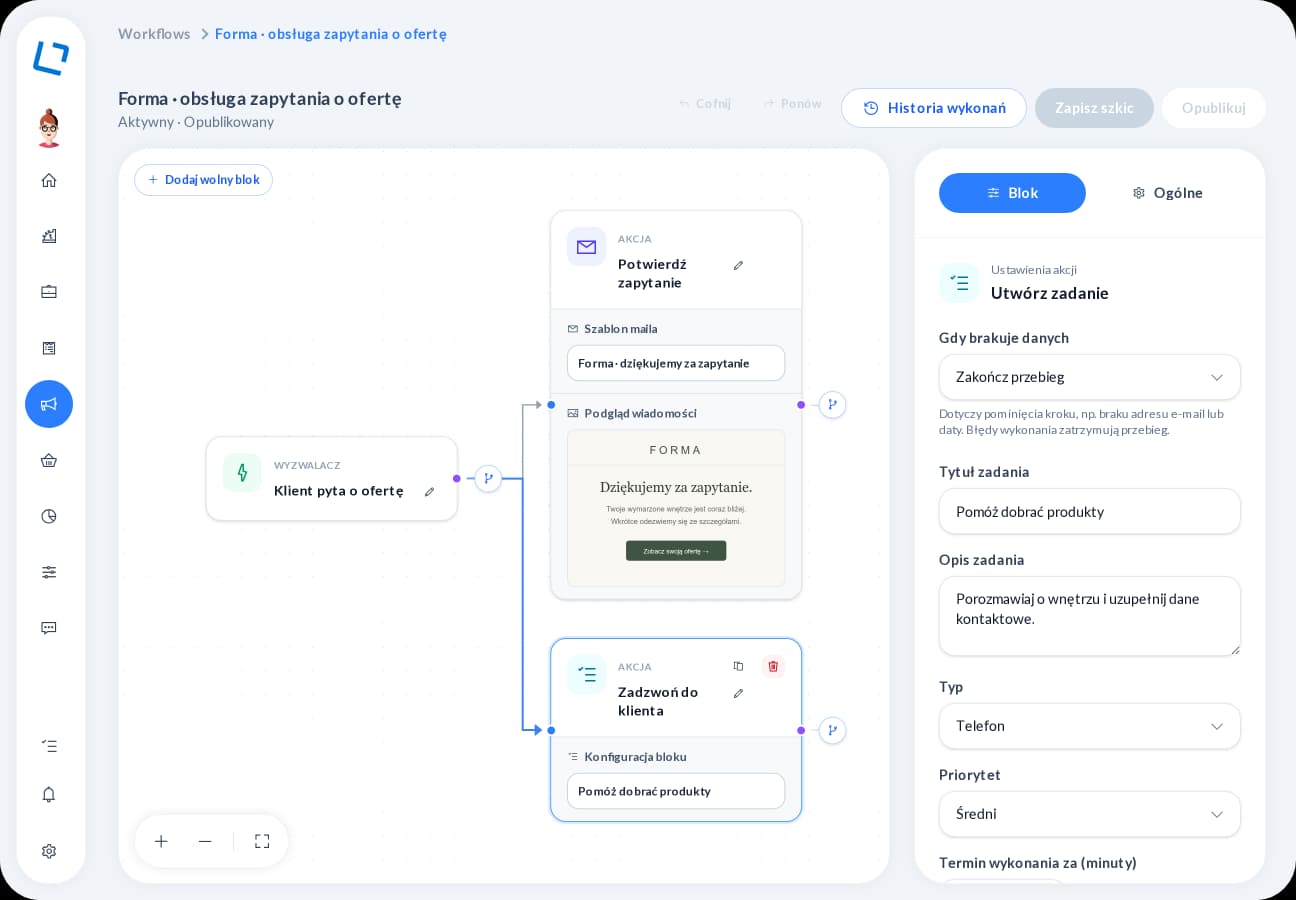
An inquiry does not have to end with a manually sent email and a manually added task. Arrange the next steps, define conditions and inspect how the published process runs in practice.
Connect triggers, conditions and wait times in the visual editor. See the sequence of actions and decide what happens based on contact or deal data.
A configured workflow sends email or SMS messages, creates tasks and updates data, tags or sales stages. The account owner does not have to run each repeatable step manually.
After publishing, review run history, including skipped and failed steps. It is easier to establish what ran and which part needs checking.
Start a scenario after a form submission or a deal stage change, for example.
Add a message, a wait and a condition to choose the next step.
Activate the finished process and review its run history.
Automation
Tell us where your customers come from, how you prepare proposals and what happens after you send them. We will demonstrate relevant features in one scenario, from inquiry to the account owner's next action. Together, we will establish the modules, integrations and configuration you need.